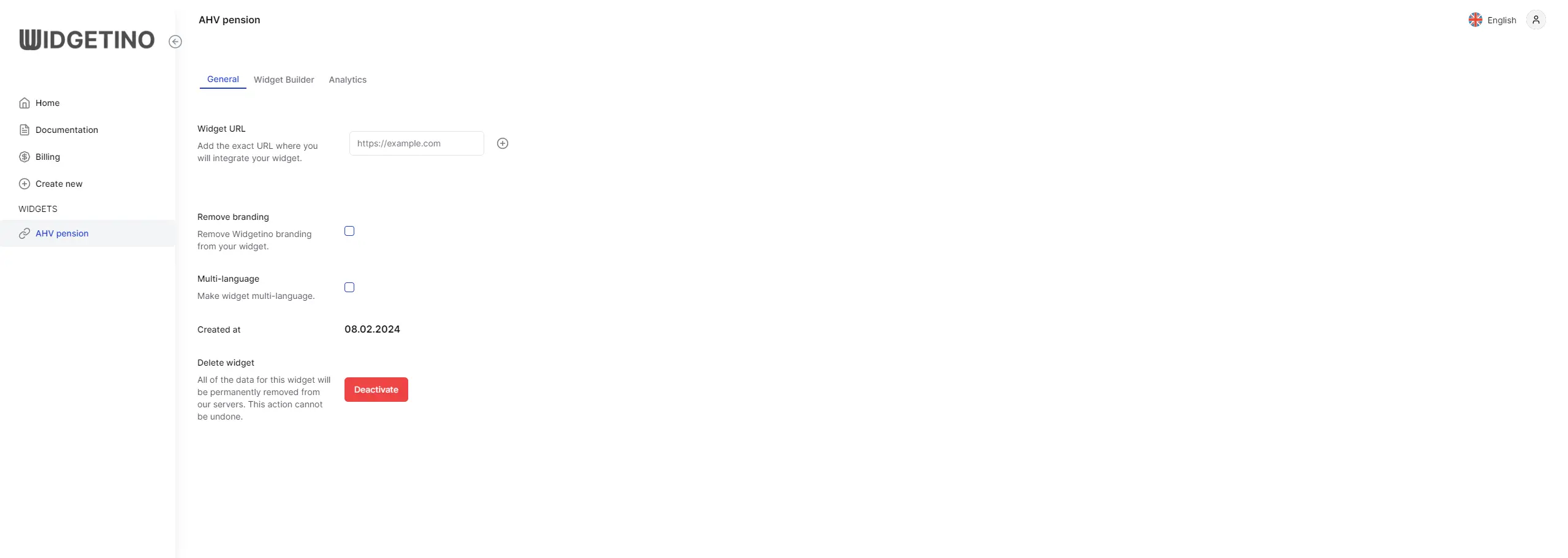
General
When discussing the "General" tab of a widget configuration interface, we delve into several key features that enhance user experience and customization.
Within this section, the "Widget URL" option stands out, allowing users to specify the exact URL where the widget will be integrated. This is crucial for seamless integration on various webpages, ensuring the widget appears exactly where it's intended.
Another significant feature is the "Remove Branding" option. This allows for a more polished and brand-aligned presentation by removing Widgetino's default branding from the widget. It's particularly beneficial for businesses looking to maintain a consistent brand image across all digital touchpoints.
The "Multi-Language" functionality introduces versatility to the widget, enabling it to support multiple languages. This feature is indispensable for reaching a broader, international audience, ensuring that users can interact with the widget in their preferred language.
Additionally, the "Created At" information provides a timestamp of when the widget was originally created. This detail is helpful for tracking the widget's lifecycle and versioning.
Finally, the inclusion of "Activate" and "Deactivate" buttons offers straightforward control over the widget's operational status. Users can easily toggle the widget's functionality, activating it to make it available to their audience or deactivating it when it's no longer needed or undergoing updates.
General Tab