Widget Builder
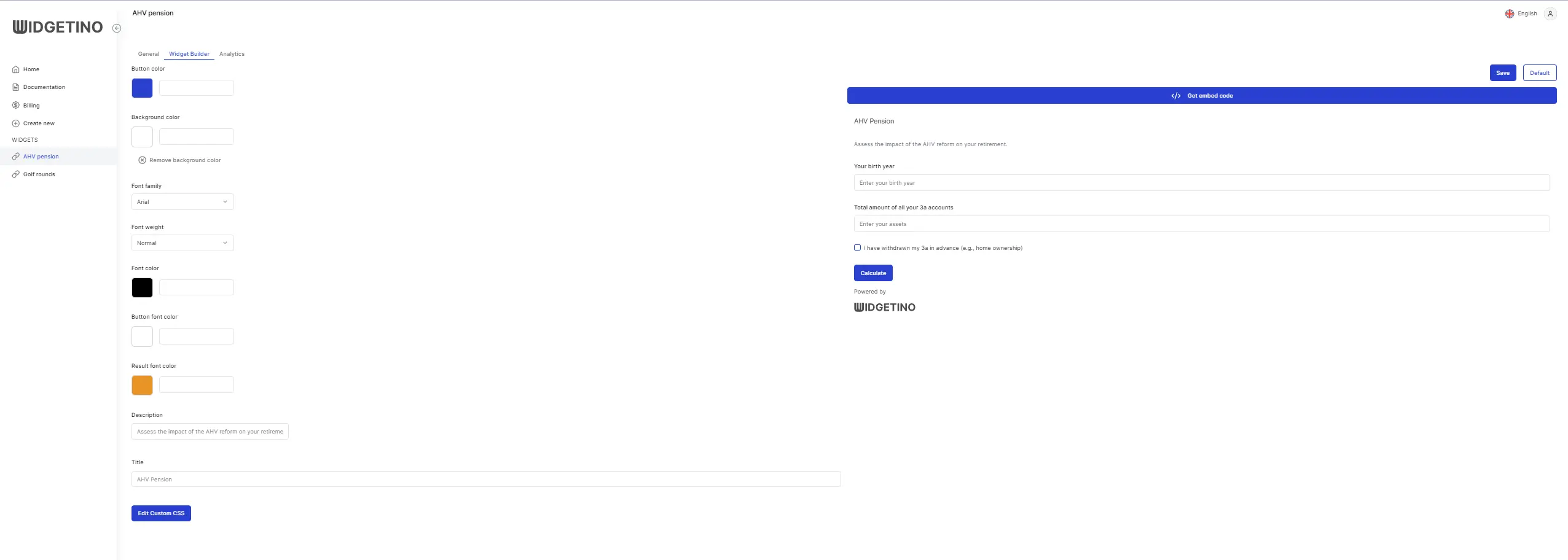
The Widget Builder tab serves as an intuitive and comprehensive interface designed for users to effortlessly customize the appearance and functionality of their widget. This tab presents a variety of customization options, allowing users to fine-tune the aesthetic and interactive elements of their widget to better align with their website's design and their personal preferences.
Button Color: This option enables users to select the color of the buttons on the widget. It ensures that the buttons stand out or blend in harmoniously with the overall design, enhancing the visual appeal and user interaction.
Background Color: Users can choose a background color for the widget, setting the tone and mood. A well-chosen background color can make the widget more inviting and easier to read.
Font Family: This setting allows the selection of the font style for the text displayed within the widget. By offering a range of fonts, it caters to different design preferences and brand identities.
Font Weight: Adjusting the font weight lets users control the thickness of the text, enabling them to emphasize certain text elements or maintain a consistent visual weight throughout the widget.
Font Color: Users can specify the color of the text, which is crucial for readability and visual harmony. The right font color can make the text stand out against the background.
Button Font Color: This specifically alters the color of the text on the buttons, ensuring that the button labels are clear and prominent against the button's background color.
Result Font Color: For widgets that display results or outputs, this option allows the customization of the font color used for these results, highlighting them or integrating them seamlessly into the overall design.
Description and Title: These fields are where users can input descriptive text and titles for their widget. This text can guide the user through the widget's functionality or provide essential information.
And widget: This feature indicates that the widget includes a widget function, positioned for easy access and use. This dual-functionality aspect emphasizes the widget's versatility, catering to users' needs for both customization and practical utility.
Widget Builder